
Step Three: Meet the HESI Exam or Equivalent Requirements
To be eligible for NURS-1010, you must take the Health Education Systems Inc. (HESI) Admission Assessment (A2) Exam.
- You must achieve a minimum score of 75% on the Math Section
- You must achieve a minimum score of 75% on the English Composite Section. This includes Grammar, Reading, and Vocabulary. You must complete all sections at the time of testing in order for the score to count.
The exam can be taken at any time. Attempts must take place at least one month (30 days) apart. If a second attempt is needed only the section(s), math or english, scoring below 75% needs to be completed. There is a limit of two attempts in a 12 month period. Results are valid indefinitely.
| NURS-1010 Semester Start | HESI Completion Deadline |
| Fall | Last Friday in June |
| Spring | Last Friday in October |
| Summer | Last Friday in March |
Effective June 1, 2020, the HESI A2 Exam is no longer required for any individuals that have obtained an Associate Degree or higher.
Exam Registration
1. If you do not yet have an Evolve account, create one here.
- In the top right corner of the screen, click sign in. Then click on create an account.
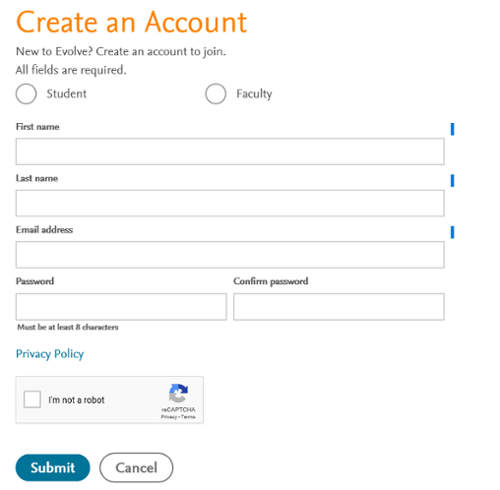
The first and last name on your Evolve account must match your government-issued photo ID (e.g., driver’s license or passport). You will not be admitted into the testing lab if there is any discrepancy. (Middle name/initial not required.)
You must include your S-number when creating your Evolve account, as shown below.
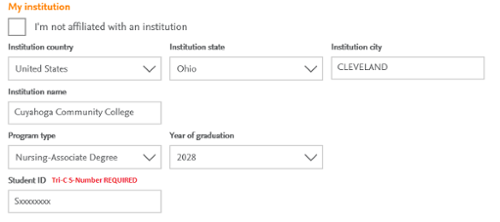
Problems creating your Evolve account? Need Help? email:Hesi_DistanceTesting@elsevier.com
Call Elsevier student support at 800-222-9570 or live chat with the Elsevier Support Center
Register for the HESI A2 Department ID: 198278
Testing onsite at a Prometric Testing Center
Note: Exam fee must be paid at registration for each attempt.
- Login to your Evolve account and follow the steps below:
- Click “I’m a Student.”
- In the HESI Secured Exams section, click “Register for Results and Remediation.”
- Click “Register for Distance Testing” to place this in your cart, then click “Redeem/Checkout” from the cart screen.
- Returning users: Enter your Evolve username and password, then click “Login.” New users: Enter your name, email, password and institution information (if applicable). Click “Continue.”
- Check “Yes, I accept the Registered User Agreement.”
- Submit.
*Testing is no longer available on campus powered through Cuyahoga Community College.
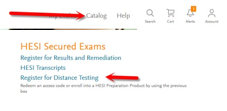
2. Log in to your Evolve account and follow the steps below:
- Click “HESI Assessment Student Access.”
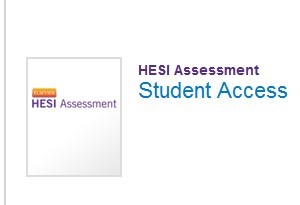
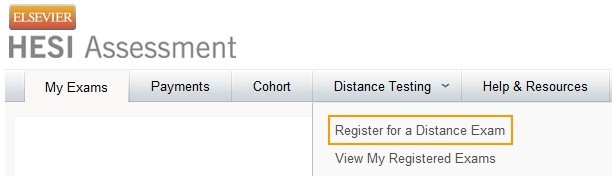
b. On the Distance Testing tab, click "Register for a Distance Exam."
c. Complete the required information, * check the box and submit.
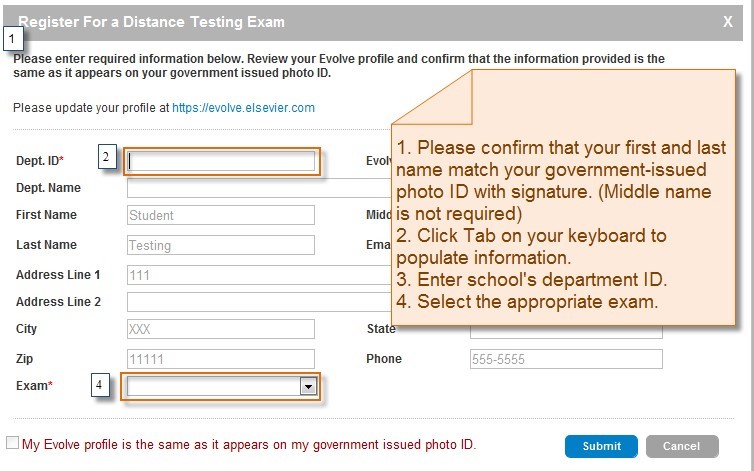
*Important Information
- Department ID: 198278
- Do not use the school’s department ID as your student ID when creating your Evolve account.
- The first and last name on your Evolve account must match your government-issued photo ID (e.g., driver’s license or passport). You will not be admitted into the testing lab if there is any discrepancy.
- Your government-issued ID must include your signature and a photo that resembles your current appearance. Middle name/initial not required.
- Do not register for Multiple Schools or Multiple Exam Versions.
- Generic ADN applicants select A2 V-1 or A2 V-2.
After submitting your information, you will receive a Confirmation Notice via email indicating that you may schedule your exam. Review the information carefully. If your name is incorrect, or if it has changed, email exameligibility@elsevier.com. Failure to do so could result in forfeiture of your testing appointment and associated fees.
Note: You will receive your Eligibility ID (Evolve username) via email. Add exameligibility@elsevier.com to your safe sender list to avoid delays, and be sure to check your spam/junk folder.