
60 years
My Tri-C
My Tri-C Student Resources News & Events Corporate College Alumni Give
Paying for College Apply Visit

Getting Started

Whether you want to earn a degree, improve your skills, get certified, train for a new career, or explore a new hobby, you can choose from many programs and courses.

Get Started
What type of student are you?
New Student
Returning
Transfer
Visiting
International
College Credit Plus
Non-Credit
All Student Types

Classes & Programs

Explore your interests and find a program that puts you on the path to a bright future. Tri-C offers both credit and non-credit courses as well as certificate programs in most career fields.

View all

Degree Programs & Certificates

More than 1,000 credit courses are offered each semester in more than 200 career and technical programs. Tri-C also grants short-term certificates, certificates of proficiency and post-degree professional certificates.

View A-Z Program List

Workforce Training & Professional Development

Tri-C's Workforce Training provides both non-credit and credit training for individuals and businesses to assist individuals with skills leading to employment. Tri-C's Corporate College provides professional development and corporate training opportunities.

Learn more

Community Programming for Adults & Youth

Tri-C offers a variety of affordable and convenient community programs for both adults and youth. These programs are designed to promote individual development.

Learn more

Request Info

Tri-C is here for you. Have a question about a program or service? We'll help you find the answer.

Ask a Question

Live Chat

Chat live with college departments and services.

Start live chat

Tri-C 24/7

Get answers to your questions 24 hours a day, 7 days a week, 365 days a year.

Get Answers

Getting Started

Whether you want to earn a degree, improve your skills, get certified, train for a new career, or explore a new hobby, you can choose from many programs and courses.

Get Started
What type of student are you? New Student Returning Transfer Visiting International College Credit Plus Non-Credit All Student Types

Classes & Programs

Explore your interests and find a program that puts you on the path to a bright future. Tri-C offers both credit and non-credit courses as well as certificate programs in most career fields.

View all

Degree Programs & Certificates

More than 1,000 credit courses are offered each semester in more than 200 career and technical programs. Tri-C also grants short-term certificates, certificates of proficiency and post-degree professional certificates.

View A-Z Program List

Workforce Training & Professional Development

Tri-C's Workforce Training provides both non-credit and credit training for individuals and businesses to assist individuals with skills leading to employment. Tri-C's Corporate College provides professional development and corporate training opportunities.

Learn more

Community Programming for Adults & Youth

Tri-C offers a variety of affordable and convenient community programs for both adults and youth. These programs are designed to promote individual development.

Learn more
Paying for College
Apply
Visit

Request Info

Tri-C is here for you. Have a question about a program or service? We'll help you find the answer.

Ask a Question

Live Chat

Chat live with college departments and services.

Start live chat

Tri-C 24/7

Get answers to your questions 24 hours a day, 7 days a week, 365 days a year.

Get Answers
Student Resources News & Events Corporate College Alumni Give

Adjunct Services

Adjunct Services Adjunct Development and Professional Training (ADAPT) Articulation, Transfer and Prior Learning Centers for Learning Excellence (CLE) Counseling Curriculum Development Faculty Central Home Faculty Development Human Resources Information Technology Services Learning Outcomes Assessment Library Online Learning and Academic Technology (OLAT) Completing the ADAPT Track and Stipend Request: A Step-by-Step Guide
  • Tri-C Home
  • »
  • Faculty Central
  • »
  • Adjunct Services
  • »
  • ADAPT Guide

Completing the ADAPT Track and Stipend Request: A Step-by-Step Guide
ADAPT

I. Eligibility and Requirements

Eligibility: Confirm your cohort status. You must complete the correct cohort track as prescribed within COMPASS:

Track I: First-Year Cohort – ADJ1105

  • For adjunct faculty who are new hires, new to teaching at Tri-C or any institution, and rehires who have been inactive for one or more years.

Track II: Second-Year Cohort (Launching Fall 2026) – ADJ1106

  • For new hires who have completed Track I, rehires who have been inactive for less than one year, and those whom the school dean or associate dean specifically designates to participate.

Track III: Third-Year and Beyond Cohort – ADJ1107

  • For adjunct faculty, lecturers, part-time counselors and librarians who have completed three years or more of teaching, and those who are specifically designated by the school dean or associate dean to participate.

II. Login and Access

Log in to my Tri-C Space and search for the "Employee Success Center COMPASS" card.
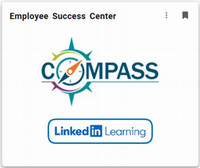
Employee Success Center COMPASS card

Once COMPASS opens, type in the Taxonomy Code in the search box (upper right corner) for the track you will complete: ADJ1105 for Track 1, ADJ1106 for Track II or ADJ1107 for Track III.

Action: Click on the applicable ADAPT track link.

applicable ADAPT Track link

Action: Click on the "Request" button to view the ADAPT curriculum.

Request button

Customizing Your ADAPT Cohort Journey:

Next Steps: The customized ADAPT cohort track you are completing predetermines your sequential next steps (which must be completed in this order):

  • ADJ1105 ADAPT Track I: First-Year Cohort
    • Step 1: Complete the "Start Here to Review Information" section.
    • Step 2: Complete the "Track I: Curriculum" section.
    • Step 3: Complete the "Track I: Reflection and Feedback" section.
    • Start: Click the "Launch" button for each section.
  • ADJ1106 ADAPT Track II: Second-Year Cohort (Launching Fall 2026)
  • ADJ1107 ADAPT Track III: Third-Year and Beyond Cohort
    • Step 1: Complete the "Start Here to Review Information" section.
    • Step 2: Complete the "Track III: Curriculum" section.
    • Step 3: Complete the "Track III: Reflection and Feedback" section.
    • Start: Click the "Launch" button for each section.

How To Monitor Progress:

  • Completion Indicators: A check mark appears once you complete a section.
  • Curriculum Progress: Your progress percentage updates automatically as you move forward.

Note: Completing the "Reflection and Feedback" section for a track unlocks the Stipend Request Form for submission.


III. Start the Stipend Request Form

Once you complete the "Reflection and Feedback" section for a track, you can proceed to the final step of completing and submitting the Stipend Request Form.

Action: Click on the "Launch" button to the right of the Stipend Request Form, located at the bottom of the curriculum for each track in COMPASS.

Launch button to the right of the Stipend Request Form

Action: Click on the Stipend Request Form link to complete the form.
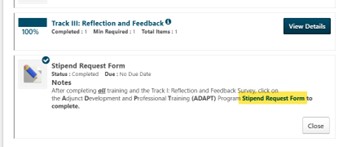
Stipend Request Form link

Action: Complete all remaining required fields. Please confirm that the prepopulated information (S-Number, full name and phone number) is correct.
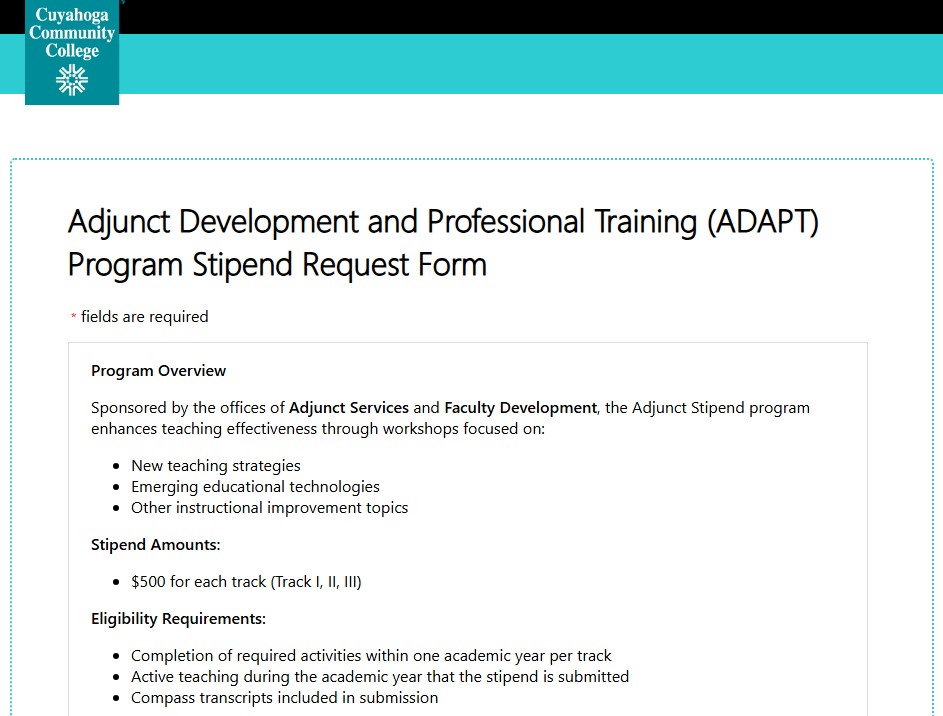
ADAPT request form

Upload Compass Transcript:

  • Action: Upload your completed COMPASS transcript only (do not submit individual session certificates). Instructions for retrieving the transcript are inside the stipend request form. For external transcripts, view the steps on KWeb. (Tri-C credentials may be required to view the PDF.)

Survey:

  • Respond to the two-question survey.

Submit:

  • Action: Click the final "Submit" button.

Submit button

Confirmation of Receipt:

  • If you do not receive a confirmation screen immediately upon clicking "Submit," please assume your submission failed and attempt it again using a different web browser.

VI. Next Steps

Decision Notification:

  • You will receive a confirmation email from Adjunct Services once your request has been fully reviewed and approved.

Payment Inquiries:

  • Contact todd.prusha@tri-c.edu regarding any questions on stipend payouts.
  • (Note: disbursement timelines vary after approval.)

Back to Adjunct Development and Professional Training (ADAPT)

How to reach us

Collegewide Email
adjunctservices@tri-c.edu

Eastern Campus 
EEC 126
216-987-2226

Metropolitan Campus
MCC 109
216-987-4225

Western Campus/Brunswick
WSS G201
216-987-5227

Westshore Campus
SLT 231
216-987-5588

© 2025 Cuyahoga Community College
700 Carnegie Avenue
Cleveland, Ohio 44115

Quick Links

Employment at Tri-C
my Tri-C space
Athletics
Brightspace
Bookstore
Course Search
College Catalog
Library
Technical Support
Transcripts
Spirit Shop

About Tri-C

About
President's Office
Accreditation
Administrative Departments
Accessibility
Board of Trustees
Mission, Vision, Values and Statement of Commitment
Student Consumer Information
Title IX Equal Opportunity
Privacy Policy

Campus Locations

Map & Directions
Parking
Campus Police

Connect With Us

Visit Tri-C
Phone Directory
Tri-C 24/7
Ask a Question
Live Chat
Tri-C 216-987-6000 Corporate College 216-987-2800